<?xml version="1.0" encoding="utf-8"?><feed xmlns="http://www.w3.org/2005/Atom" ><generator uri="https://jekyllrb.com/" version="3.10.0">Jekyll</generator><link href="https://blog.kelvinbytes.com/feed.xml" rel="self" type="application/atom+xml" /><link href="https://blog.kelvinbytes.com/" rel="alternate" type="text/html" /><updated>2026-04-18T21:23:02+00:00</updated><id>https://blog.kelvinbytes.com/feed.xml</id><title type="html">Kelvin Bytes</title><subtitle>Six one east and half dozen west</subtitle><author><name>Kelvin Shen</name></author><entry><title type="html">Managed Identity</title><link href="https://blog.kelvinbytes.com/2026-04-06-managed-identity.html" rel="alternate" type="text/html" title="Managed Identity" /><published>2026-04-06T20:00:00+00:00</published><updated>2026-04-06T20:00:00+00:00</updated><id>https://blog.kelvinbytes.com/managed-identity</id><content type="html" xml:base="https://blog.kelvinbytes.com/2026-04-06-managed-identity.html"><![CDATA[<p>Managed Identities are the natural evolution of service principals because they completely eliminate the need to manage and store secrets.</p>

<p>Integrations can be either inbound or outbound. This article will focus on outbound integration—specifically, using a Managed Identity to allow Power Platform (Dataverse) plugins to securely call external Azure resources.</p>

<h3 id="overall-goal">Overall Goal</h3>
<p>The primary purpose of configuring a Managed Identity (MI) is so that Microsoft Entra ID will trust the calling plugin assembly. This allows your custom Dataverse code to securely authenticate against external Azure services without embedding credentials.</p>

<h3 id="step-by-step-implementation">Step-by-Step Implementation</h3>

<ul>
  <li>Certificate: Generate the <code class="language-plaintext highlighter-rouge">.pfx</code> file containing the key pair.</li>
  <li>Certificate: Import the <code class="language-plaintext highlighter-rouge">.pfx</code> into the Windows certificate store.</li>
  <li>Azure: Create a user-assigned managed identity.</li>
  <li>Dataverse: Create an application user and link it to the managed identity record.</li>
  <li>Dataverse: Assign the required security roles.</li>
  <li>Development: Build the plugin <code class="language-plaintext highlighter-rouge">.dll</code>.</li>
  <li>Security: Sign the assembly using the generated certificate.</li>
  <li>Deployment: Upload the signed assembly to Dataverse.</li>
  <li>Configuration: Link the assembly with the managed identity in Dataverse.</li>
  <li>Azure: Add federated credentials and role assignments with the Azure managed identity.</li>
  <li>Validation: Test the integration.</li>
</ul>

<h3 id="generate-a-self-signed-certificate">Generate a Self-Signed Certificate</h3>
<p>Your certificate must contain a key pair (both private and public keys) to sign the assembly. Below is a PowerShell example to generate one.</p>

<div class="language-powershell highlighter-rouge"><div class="highlight"><pre class="highlight"><code><span class="nv">$kuCodeSigning</span><span class="w"> </span><span class="o">=</span><span class="w"> </span><span class="s2">"1.3.6.1.5.5.7.3.3"</span><span class="p">;</span><span class="w">

</span><span class="nv">$cert</span><span class="w"> </span><span class="o">=</span><span class="w"> </span><span class="n">New-SelfSignedCertificate</span><span class="w"> </span><span class="se">`
</span><span class="w">  </span><span class="nt">-Type</span><span class="w"> </span><span class="s2">"CodeSigningCert"</span><span class="w"> </span><span class="se">`
</span><span class="w">  </span><span class="nt">-KeyExportPolicy</span><span class="w"> </span><span class="s2">"Exportable"</span><span class="w"> </span><span class="se">`
</span><span class="w">  </span><span class="nt">-Subject</span><span class="w"> </span><span class="s2">"VivoAirManagedIdentityPlugin"</span><span class="w"> </span><span class="se">`
</span><span class="w">  </span><span class="nt">-KeyUsageProperty</span><span class="w"> </span><span class="p">@(</span><span class="s2">"Sign"</span><span class="p">)</span><span class="w"> </span><span class="se">`
</span><span class="w">  </span><span class="nt">-KeyUsage</span><span class="w"> </span><span class="p">@(</span><span class="s2">"DigitalSignature"</span><span class="p">)</span><span class="w"> </span><span class="se">`
</span><span class="w">  </span><span class="nt">-TextExtension</span><span class="w"> </span><span class="p">@(</span><span class="s2">"2.5.29.37={text}</span><span class="si">$(</span><span class="nv">$kuCodeSigning</span><span class="si">)</span><span class="s2">"</span><span class="p">,</span><span class="w"> </span><span class="s2">"2.5.29.19={text}false"</span><span class="p">)</span><span class="w"> </span><span class="se">`
</span><span class="w">  </span><span class="nt">-CertStoreLocation</span><span class="w"> </span><span class="s2">"Cert:\CurrentUser\My"</span><span class="w"> </span><span class="se">`
</span><span class="w">  </span><span class="nt">-KeyLength</span><span class="w"> </span><span class="nx">2048</span><span class="w"> </span><span class="se">`
</span><span class="w">  </span><span class="nt">-NotAfter</span><span class="w"> </span><span class="p">([</span><span class="n">DateTime</span><span class="p">]::</span><span class="n">Now.AddYears</span><span class="p">(</span><span class="mi">1</span><span class="p">))</span><span class="w"> </span><span class="err">`</span><span class="w">
  </span><span class="nt">-Provider</span><span class="w"> </span><span class="s2">"Microsoft Software Key Storage Provider"</span><span class="p">;</span><span class="w">

</span><span class="nv">$emptyPassword</span><span class="w"> </span><span class="o">=</span><span class="w"> </span><span class="p">[</span><span class="n">System.Security.SecureString</span><span class="p">]::</span><span class="n">new</span><span class="p">()</span><span class="w">

</span><span class="n">Export-PfxCertificate</span><span class="w"> </span><span class="se">`
</span><span class="w">  </span><span class="nt">-Cert</span><span class="w"> </span><span class="s2">"Cert:\CurrentUser\My\</span><span class="si">$(</span><span class="nv">$cert</span><span class="o">.</span><span class="nf">Thumbprint</span><span class="si">)</span><span class="s2">"</span><span class="w"> </span><span class="se">`
</span><span class="w">  </span><span class="nt">-FilePath</span><span class="w"> </span><span class="s2">"</span><span class="nv">$</span><span class="nn">env</span><span class="p">:</span><span class="nv">TEMP</span><span class="s2">\VivoAirManagedIdentityPlugin.pfx"</span><span class="w"> </span><span class="se">`
</span><span class="w">  </span><span class="nt">-Password</span><span class="w"> </span><span class="nv">$emptyPassword</span><span class="p">;</span><span class="w">
</span></code></pre></div></div>

<p>The <code class="language-plaintext highlighter-rouge">ku</code> in <code class="language-plaintext highlighter-rouge">kuCodeSigning</code> stands for key usage. The example provided in standard <a href="https://learn.microsoft.com/en-us/power-platform/admin/set-up-managed-identity">Microsoft documentation</a> is typically for secure email signage, which is not designed for signing plugin assemblies. The OID <code class="language-plaintext highlighter-rouge">1.3.6.1.5.5.7.3.3</code> explicitly ensures it is valid for code signing.</p>

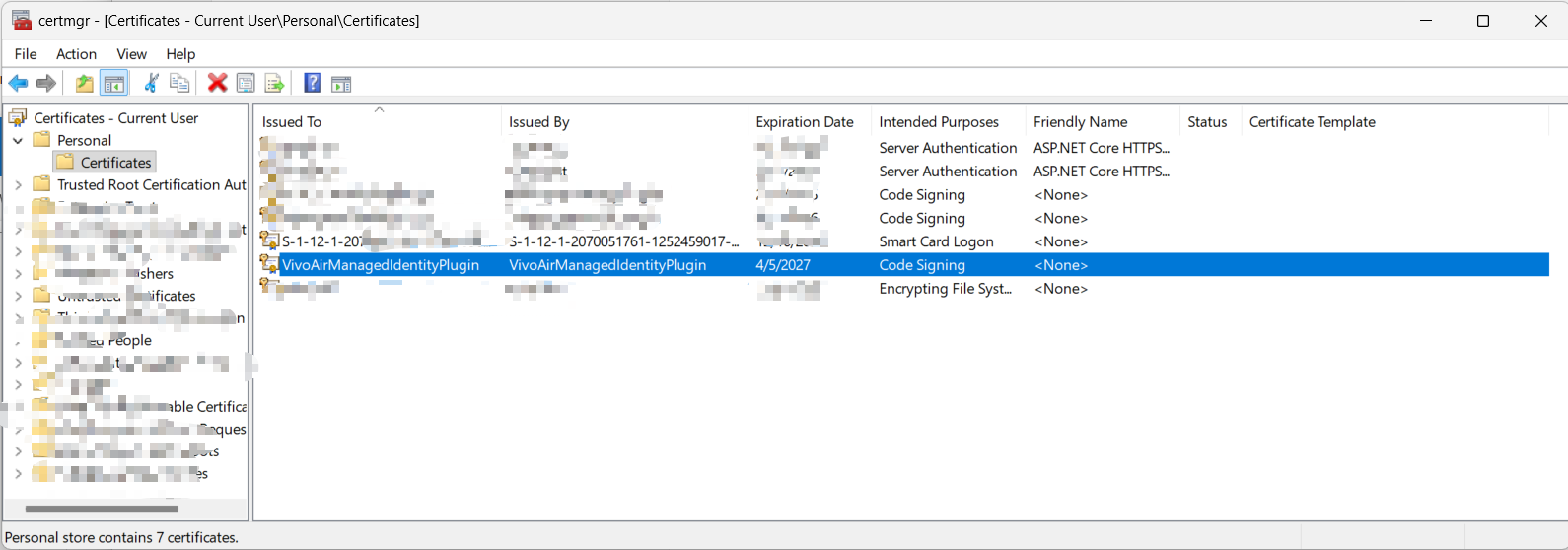
<p>You need to register the keys of the generated <code class="language-plaintext highlighter-rouge">.pfx</code> file within the Windows certificate storage. Ensure it is placed in both the Personal and Trusted Root Certification Authorities nodes for successful signing.
<img src="../images/2026-04-07-managed-identity/key-storage.png" alt="image" /></p>

<h3 id="signing-tool">Signing Tool</h3>
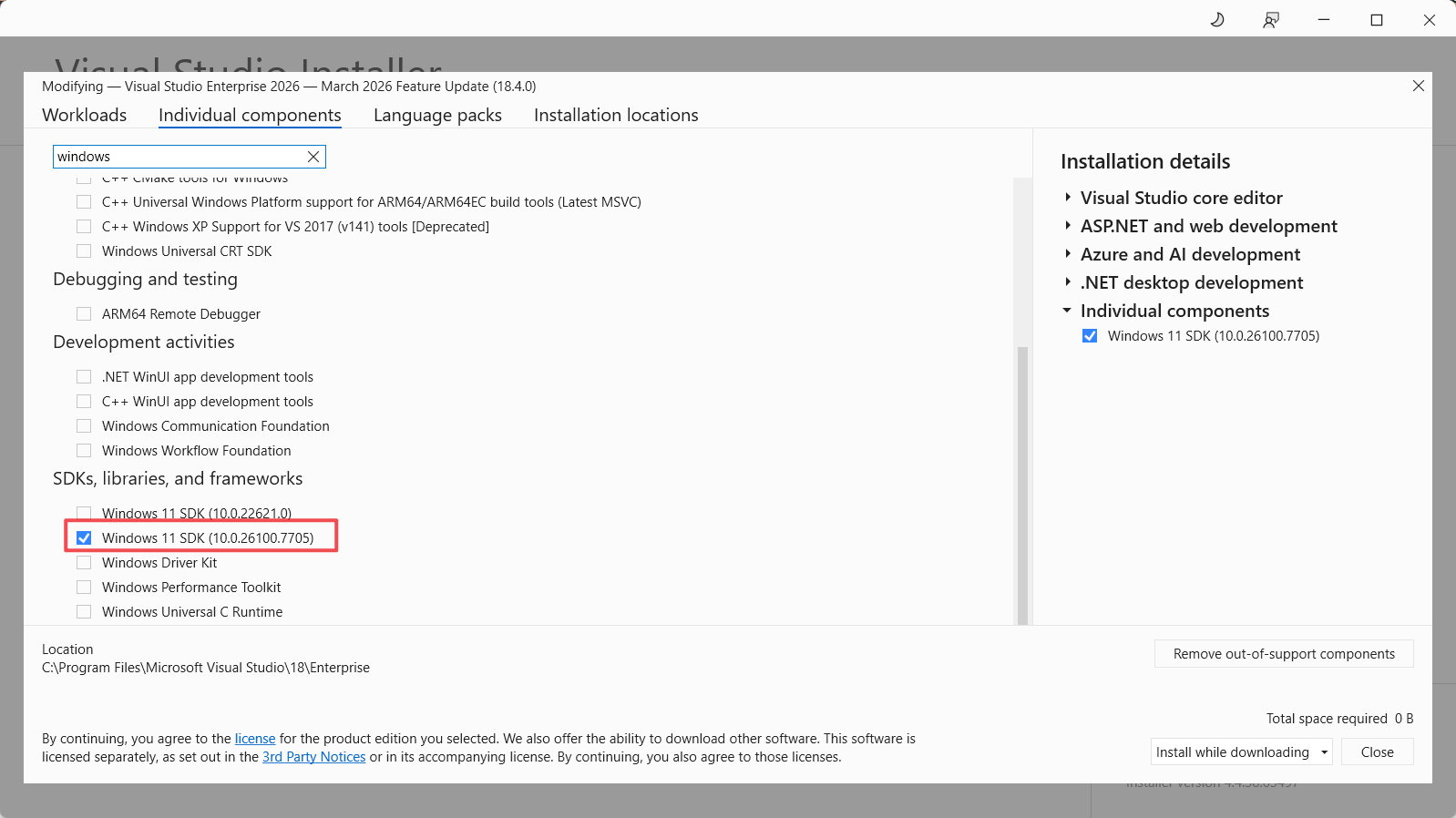
<p>Use the Windows SDK SignTool to apply the certificate to your assembly.
<img src="../images/2026-04-07-managed-identity/signtool-windows-sdk.png" alt="image" /></p>

<h3 id="create-a-managed-identity-record-in-dataverse">Create a Managed Identity Record in Dataverse</h3>
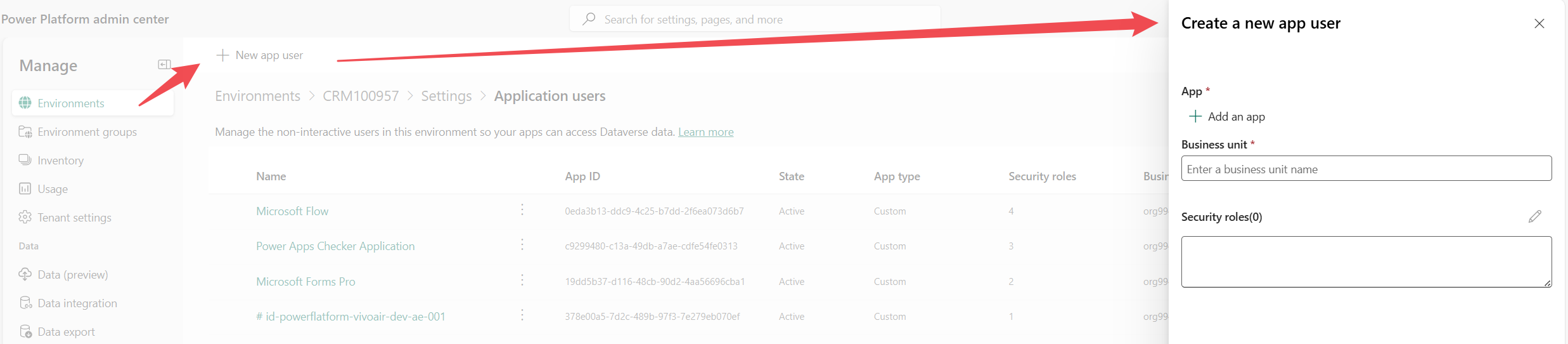
<p>You can establish this link by creating an application user in the Power Platform admin center.
<img src="../images/2026-04-07-managed-identity/create-managed-identity-record.png" alt="image" /></p>

<h3 id="calling-managed-identity-for-bear-token">Calling Managed Identity for Bear Token</h3>
<pre><code class="language-CSharp">        public string GetToken(List&lt;string&gt; scopes)
        {
            return _managedIdentityService.AcquireToken(scopes);
        }
</code></pre>

<h3 id="add-federated-security-in-azure">Add Federated Security in Azure</h3>
<p>When configuring the federated credentials in Azure, the subject string is used to pinpoint the intended caller plugin assembly. Note that the expected subject format has changed from v1 to v2.</p>

<h3 id="managed-identity-basics">Managed Identity Basics</h3>
<p>There are two types of Managed Identities: System-Assigned and User-Assigned. For Power Platform plugins connecting to Azure, we create and utilize a User-Assigned Managed Identity.</p>

<h2 id="references">References</h2>
<ul>
  <li><a href="https://www.clive-oldridge.com/azure/2024/10/14/set-up-managed-identity-for-power-platform-plugins.html">Set up managed identity for Power Platform Plugins</a></li>
  <li><a href="https://www.clive-oldridge.com/azure/2024/11/22/power-platform-plugin-package-managed-identity.html">Power Platform Plugin Package – Managed identity</a></li>
  <li><a href="https://learn.microsoft.com/en-us/power-platform/admin/set-up-managed-identity">Set up Power Platform managed identity for Dataverse plug-ins or plug-in packages</a></li>
  <li><a href="https://learn.microsoft.com/en-us/dotnet/framework/tools/signtool-exe">SignTool.exe (Sign Tool)</a></li>
  <li><a href="https://learn.microsoft.com/en-us/powershell/module/pki/new-selfsignedcertificate?view=windowsserver2025-ps#example-3">New-SelfSignedCertificate</a></li>
</ul>

<h2 id="future-posts">Future Posts</h2>
<ul>
  <li>Managed Identity with Plugin Packages</li>
  <li>Managed Identity with vNet and apim</li>
</ul>]]></content><author><name>Kelvin Shen</name></author><category term="Technology" /><category term="Power Platform" /><category term="ALM" /><category term="Azure" /><category term="Integration" /><category term="Twitter" /><category term="Facebook" /><category term="LinkedIn" /><summary type="html"><![CDATA[Managed Identities are the natural evolution of service principals because they completely eliminate the need to manage and store secrets.]]></summary></entry><entry><title type="html">Power Platform CICD Evolution</title><link href="https://blog.kelvinbytes.com/2025-07-04-power-platform-cicd-evolution.html" rel="alternate" type="text/html" title="Power Platform CICD Evolution" /><published>2025-07-04T00:00:00+00:00</published><updated>2025-07-04T00:00:00+00:00</updated><id>https://blog.kelvinbytes.com/power-platform-cicd-evolution</id><content type="html" xml:base="https://blog.kelvinbytes.com/2025-07-04-power-platform-cicd-evolution.html"><![CDATA[<h2 id="why-cicd-and-alm">Why CI/CD and ALM?</h2>
<p>We need CI/CD and ALM in Power Platform to move from ad‑hoc manual exports/imports to predictable, governed delivery.</p>

<h2 id="key-pillars">Key Pillars</h2>
<h3 id="development-experience">Development Experience</h3>
<ul>
  <li>Plugin Registration</li>
  <li>Codegen</li>
  <li>Unpack Solutions</li>
  <li>Pack Solutions</li>
</ul>

<h3 id="strategies">Strategies</h3>
<h4 id="solution-segregation">Solution Segregation</h4>
<p>Option 1: Split by Features
But you will still need a core solution for shared components, and if the core solution becomes too big, you need to split it.</p>

<p>Option 2: Split by Components
Customization, Plugin, Workflows and etc.</p>

<h4 id="layering">Layering</h4>
<p>The final product is like a cake and each solution is like a layer of the cakse. The solution importing sequence is important because it dictates if and how solution layer are stacked and which overwrite which.</p>

<h3 id="cicd-experience">CICD Experience</h3>
<ul>
  <li>Deployment targeting - you can target multiple systems, so called fan out. You can keep the deployment mapping configration in the json.</li>
  <li>PR merge gate with Pre-validation and code review.</li>
  <li>Deployment gate - approver before deployment goes ahead</li>
  <li>Deploy - ADO stages and steps and tools.</li>
  <li>Post Deploy - master data import</li>
</ul>

<h2 id="evolution">Evolution</h2>
<h3 id="manually-export-solutions-in-a-folder">Manually export solutions in a folder</h3>
<p>Back in the bad old days, the packaging are handled manually, meaning the dev team will manually export solutions and put them in a folder in the source repository. Later the CICD pipeline will deploy the solutions from the repo. Optionally, you can provide CICD pipeline with powershell scripts to unpack the zip solution and inject the built plugin dlls and re-package.</p>

<h3 id="code-based-package">Code Based Package</h3>
<p>We moved away from committing exported solution .zip files. Instead we use PowerShell with the pac CLI to unpack solutions and commit only the unpacked XML (solution definition) to source control. This gives us:</p>
<ul>
  <li>Meaningful diffs (component level instead of opaque binaries)</li>
  <li>Better traceability (who changed which attribute/artifact)</li>
  <li>Easier observability and code review</li>
</ul>

<p>Discipline is critical. The unpacked solution definition in git must always mirror the originating environment. When drift appears, developers are tempted to hand‑edit XML to “force” a change into the next environment—slow, brittle, and error‑prone.</p>

<p>Repository &amp; branching: all squads contribute to the same repository and share a single release/trunk branch (with short‑lived feature branches). We previously experimented with letting squads keep divergent copies of the same solution for “parallel development” and then hand‑merge XML. Outcome: frequent pipeline failures, sprawling merge conflicts across many XML files, and elongated release cycles.</p>

<p>Lessons learned:</p>
<ol>
  <li>Don’t manually merge unpacked solution XML. Treat the environment as source of truth; always re‑export/unpack/overwrite instead of editing.</li>
  <li>Maintain one authoritative branch lineage per solution; avoid long‑running parallel variants.</li>
  <li>Automate sync validation (pre‑PR or pipeline) to catch drift early.</li>
  <li>Flow changes forward only (dev → test → prod). Avoid reverse edits by hacking XML.</li>
  <li>Make pack/unpack scripts idempotent and run them locally and in CI to eliminate divergence.</li>
</ol>

<p>Core principle: no code‑level merging of solution definitions; solution evolution moves one way toward higher environments.</p>

<h3 id="ppdo">PPDO</h3>
<p><a href="https://github.com/microsoft/powerplatform-build-tools">Power Platform Devops</a> is community initiated toolkit which helps with packing, unpacking, codegen, configuration data export and other packing related tasks.</p>

<h3 id="alm-accelerator">ALM accelerator</h3>
<p><a href="https://learn.microsoft.com/en-us/power-platform/guidance/alm-accelerator/overview">ALM Accelerator for Power Platform</a> is microsoft initiated toolkit which helps with packing, unpacking, deployment mapping, pipeline yaml templates and etc.</p>

<h3 id="power-platform-native-git-integration">Power Platform native git integration</h3>
<p><a href="https://learn.microsoft.com/en-us/power-platform/alm/git-integration/overview">Git integration in Power Platform</a> is the Power Platform native support for solution sync and deployment.</p>]]></content><author><name>Kelvin Shen</name></author><category term="Technology" /><category term="Power Platform" /><category term="ALM" /><category term="Twitter" /><category term="Facebook" /><category term="LinkedIn" /><summary type="html"><![CDATA[Why CI/CD and ALM? We need CI/CD and ALM in Power Platform to move from ad‑hoc manual exports/imports to predictable, governed delivery.]]></summary></entry><entry><title type="html">PowerFx Data Query Grouping</title><link href="https://blog.kelvinbytes.com/2025-06-27-powerfx-data-query-group.html" rel="alternate" type="text/html" title="PowerFx Data Query Grouping" /><published>2025-06-27T00:00:00+00:00</published><updated>2025-06-27T00:00:00+00:00</updated><id>https://blog.kelvinbytes.com/powerfx-data-query-group</id><content type="html" xml:base="https://blog.kelvinbytes.com/2025-06-27-powerfx-data-query-group.html"><![CDATA[<h3 id="grouping-example">Grouping Example</h3>
<div class="language-plaintext highlighter-rouge"><div class="highlight"><pre class="highlight"><code>// Does not work
ClearCollect(
    colEmployeesGrouped,
    ForAll(
        Distinct(colEmployees, Department),
        With(
            {
                currentDept: ThisRecord.Value,
                matchingRecords: Filter(colEmployees, Department = ThisRecord.Department)
            },
            {
                currentDeptTest: currentDept,
                matchingRecordsTemp: matchingRecords,
                matchingRecordsCount: CountRows(matchingRecords)
             }
        )
    )
);
</code></pre></div></div>

<div class="language-plaintext highlighter-rouge"><div class="highlight"><pre class="highlight"><code>// Works
ClearCollect(
    colEmployeesGrouped,
    ForAll(
        Distinct(colEmployees, Department),
        With(
            {
                currentDept: ThisRecord.Value
            },
            {
                Department: First(Filter(colEmployees, Department = currentDept)).Department,
                EmployeeNames: Concat(Filter(colEmployees, Department = currentDept), FullName, "; "),
                JobTitles: Concat(Filter(colEmployees, Department = currentDept), JobTitle, "; ")
             }
        )
    )
);
</code></pre></div></div>

<p>The top code snippet doesn’t work is because ThisRecord.Department doesn’t exist. It will not throw any errors but you will get empty collection rather than expected data.</p>

<p>The problematic code</p>
<div class="language-plaintext highlighter-rouge"><div class="highlight"><pre class="highlight"><code>Filter(colEmployees, Department = ThisRecord.Department)
</code></pre></div></div>

<p>To fix it, use ThisRecord.Value instead.</p>
<div class="language-plaintext highlighter-rouge"><div class="highlight"><pre class="highlight"><code>Filter(colEmployees, Department = ThisRecord.Value)
</code></pre></div></div>

<p>So, the takeaway from this is when looping with ForAll, the current record context is super important, i.e. This Record.</p>

<h3 id="thisrecord-example">ThisRecord example</h3>
<div class="language-plaintext highlighter-rouge"><div class="highlight"><pre class="highlight"><code>ClearCollect(
    colPartiesGrouped,
    ForAll(
        Distinct(colCaseParties, CasePartyOriginCombined),
        With(
            {
                currentOrigin: ThisRecord.Value,
                matchingRecords: Filter(colCaseParties, CasePartyOriginCombined = ThisRecord.Value)
            },
            {
                CasePartyOriginCombined: First(Filter(colCaseParties, CasePartyOriginCombined = currentOrigin)).CasePartyNameCombined,
                CasePartyRoleNames: Concat(Filter(colCaseParties, CasePartyOriginCombined = currentOrigin), CasePartyRoleName, "; "),
                CasePartyLawyerNames: Concat(Filter(colCaseParties, CasePartyOriginCombined = currentOrigin), CasePartyLawyerName, "; ")
             }
        )
    )
);
</code></pre></div></div>

<p>The value of ThisRecord changes depend on the scope.</p>

<div class="language-plaintext highlighter-rouge"><div class="highlight"><pre class="highlight"><code>currentOrigin: ThisRecord.Value 
</code></pre></div></div>
<p>The scope of ThisRecord is Distinct(colCaseParties, CasePartyOriginCombined)</p>

<div class="language-plaintext highlighter-rouge"><div class="highlight"><pre class="highlight"><code>matchingRecords: Filter(colCaseParties, CasePartyOriginCombined = ThisRecord.Value)
</code></pre></div></div>
<p>The scope of ThisRecord is colCaseParties</p>

<h3 id="nested-with">Nested With</h3>
<div class="language-plaintext highlighter-rouge"><div class="highlight"><pre class="highlight"><code>ClearCollect(
    colPartiesGrouped,
    ForAll(
        Distinct(colCaseParties, CasePartyOriginCombined),
        With(
            {
                currentOrigin: ThisRecord.Value,
                matchingRecords: Filter(colCaseParties, CasePartyOriginCombined = currentOrigin)
            },
            {
                CasePartyOriginCombined: First(Filter(colCaseParties, CasePartyOriginCombined = currentOrigin)).CasePartyNameCombined,
                CasePartyRoleNames: Concat(Filter(colCaseParties, CasePartyOriginCombined = currentOrigin), CasePartyRoleName, "; "),
                CasePartyLawyerNames: Concat(Filter(colCaseParties, CasePartyOriginCombined = currentOrigin), CasePartyLawyerName, "; ")
             }
        )
    )
);
</code></pre></div></div>
<p>The above code will not work because of currentOrigin is not recognized inside Filter(colCaseParties, CasePartyOriginCombined = currentOrigin).</p>

<div class="language-plaintext highlighter-rouge"><div class="highlight"><pre class="highlight"><code>ClearCollect(
    colPartiesGrouped,
    ForAll(
        Distinct(colCaseParties, CasePartyOriginCombined),
        With(
            {
                currentOrigin: ThisRecord.Value
            },
            With(
                {
                    matchingRecords: Filter(colCaseParties, CasePartyOriginCombined = currentOrigin)
                },
                {
                    CasePartyOriginCombined: First(Filter(colCaseParties, CasePartyOriginCombined = currentOrigin)).CasePartyNameCombined,
                    CasePartyRoleNames: Concat(Filter(colCaseParties, CasePartyOriginCombined = currentOrigin), CasePartyRoleName, "; "),
                    CasePartyLawyerNames: Concat(Filter(colCaseParties, CasePartyOriginCombined = currentOrigin), CasePartyLawyerName, "; ")
                }
            )
        )
    )
);
</code></pre></div></div>
<p>The above code works</p>

<div class="language-plaintext highlighter-rouge"><div class="highlight"><pre class="highlight"><code>ClearCollect(
    colPartiesGrouped,
    ForAll(
        Distinct(colCaseParties, CasePartyOriginCombined),
        With(
            {
                currentOrigin: Value,
                matchingRecords: Filter(colCaseParties, Value = ThisRecord.CasePartyOriginCombined)
            },

                {
                    CasePartyOriginCombined: First(matchingRecords).CasePartyNameCombined,
                    CasePartyRoleNames: Concat(matchingRecords, CasePartyRoleName, "; "),
                    CasePartyLawyerNames: Concat(matchingRecords, CasePartyLawyerName, "; ")
                }
            
        )
    )
);
</code></pre></div></div>
<p>Works</p>

<div class="language-plaintext highlighter-rouge"><div class="highlight"><pre class="highlight"><code>ClearCollect(
    colPartiesGrouped,
    ForAll(
        Distinct(colCaseParties, CasePartyOriginCombined) As DistinctCaseParties,
        With(
            {
                currentOrigin: DistinctCaseParties[@Value],
                matchingRecords: Filter(colCaseParties, ThisRecord.CasePartyOriginCombined = DistinctCaseParties[@Value])
            },

                {
                    CasePartyOriginCombined: First(matchingRecords).CasePartyNameCombined,
                    CasePartyRoleNames: Concat(matchingRecords, CasePartyRoleName, "; "),
                    CasePartyLawyerNames: Concat(matchingRecords, CasePartyLawyerName, "; ")
                }
            
        )
    )
);
</code></pre></div></div>
<p>Works with a disambiguation operator.</p>

<p>Record scope is for each record of a loop function like Filter.</p>

<p>Value is a special field for single columns data table sources.</p>

<p>ThisRecord symbol is for the most immidiate data context.</p>

<h2 id="references">References</h2>
<ul>
  <li><a href="https://learn.microsoft.com/en-us/power-apps/maker/canvas-apps/working-with-tables#record-scope"></a></li>
</ul>]]></content><author><name>Kelvin Shen</name></author><category term="Technology" /><category term="AI" /><category term="Twitter" /><category term="Facebook" /><category term="LinkedIn" /><summary type="html"><![CDATA[Grouping Example // Does not work ClearCollect( colEmployeesGrouped, ForAll( Distinct(colEmployees, Department), With( { currentDept: ThisRecord.Value, matchingRecords: Filter(colEmployees, Department = ThisRecord.Department) }, { currentDeptTest: currentDept, matchingRecordsTemp: matchingRecords, matchingRecordsCount: CountRows(matchingRecords) } ) ) );]]></summary></entry><entry><title type="html">PCF Debug</title><link href="https://blog.kelvinbytes.com/2025-04-03-pcf-debug.html" rel="alternate" type="text/html" title="PCF Debug" /><published>2025-04-03T00:00:00+00:00</published><updated>2025-04-03T00:00:00+00:00</updated><id>https://blog.kelvinbytes.com/pcf-debug</id><content type="html" xml:base="https://blog.kelvinbytes.com/2025-04-03-pcf-debug.html"><![CDATA[<h2 id="debug-method">Debug method</h2>
<h3 id="debugging-with-local-testing-harness">Debugging with local testing harness</h3>
<p>npm start or npm start watch</p>

<p>You can debug the PCF code component locally but the problem is it will not load the real data therefore you cannot test it with real data.</p>

<h3 id="debugging-after-deployment">Debugging after deployment</h3>
<p>After deploy, you can use browser’s developer tools for debugging.</p>

<h3 id="debugging-without-deployment">Debugging without deployment</h3>
<p>It definitely makes the dev/test feedback loop a lot faster with the benefit of testing it with real data.</p>

<h2 id="requestly">Requestly</h2>
<p>Fiddler didn’t work for me either. My browser kept saying there was a suspicious network activity when Fiddler was turned on.</p>

<p>So, I tried the other method (Requestly) based on the following msdoc articles - <a href="https://learn.microsoft.com/en-us/power-apps/developer/component-framework/debugging-custom-controls#using-requestly">Debug code components - Power Apps</a></p>

<p>Just at couple of things to note:
You need to build your PCF control in production mode in order to get the bundle.js as build output
I am using Requestly Chrome add-on for redirect network traffic to my local PCF component bundle.js. The standalone Requestly app may also work but I struggled a little bit and gave up.</p>

<h2 id="references">References</h2>
<ul>
  <li>https://learn.microsoft.com/en-us/power-apps/developer/component-framework/debugging-custom-controls#using-requestly</li>
</ul>

<hr />
<p>Okay, here’s a revised and enriched version of your blog post draft, incorporating details from the Microsoft documentation while maintaining your personal experience and perspective.</p>

<hr />

<h2 id="debugging-your-power-apps-pcf-controls-from-local-harness-to-real-data">Debugging Your Power Apps PCF Controls: From Local Harness to Real Data</h2>

<p>Developing Power Apps Component Framework (PCF) controls unlocks powerful UI customizations, but debugging them effectively can sometimes feel tricky. Fortunately, we have several methods available, ranging from quick local checks to debugging against live Dataverse data without constant redeployments. Let’s explore the main approaches.</p>

<h3 id="1-the-local-test-harness-npm-start-watch">1. The Local Test Harness (<code class="language-plaintext highlighter-rouge">npm start watch</code>)</h3>

<p>When you first start building your component logic, the quickest way to see visual changes is using the local test harness. Running <code class="language-plaintext highlighter-rouge">npm start</code> or <code class="language-plaintext highlighter-rouge">npm start watch</code> in your project directory builds your component and pops it open in a local web page.</p>

<ul>
  <li><strong>Pros:</strong>
    <ul>
      <li><strong>Fast Feedback Loop:</strong> Changes to your <code class="language-plaintext highlighter-rouge">index.ts</code>, imported modules, CSS, or resource files trigger an automatic reload in the browser. Great for rapid UI tweaks and basic logic testing.</li>
      <li><strong>Form Factor Testing:</strong> Easily switch between Web, Tablet, and Phone form factors to test responsiveness.</li>
      <li><strong>Basic Input Simulation:</strong> Allows you to provide mock data for properties defined in your manifest. For datasets, you can even load data from a CSV file.</li>
    </ul>
  </li>
  <li><strong>Cons:</strong>
    <ul>
      <li><strong>No Real Data Context:</strong> This is the biggest limitation. The harness runs entirely locally. You <strong>cannot</strong> interact with actual Dataverse data.</li>
      <li><strong>Limited API Support:</strong> Features like <code class="language-plaintext highlighter-rouge">context.webAPI</code>, dataset paging, sorting, filtering, complex lookups/choices, or navigation APIs won’t work. They’ll typically throw errors because the harness doesn’t provide the necessary Power Apps runtime context.</li>
      <li><strong>Property Updates:</strong> The <code class="language-plaintext highlighter-rouge">updatedProperties</code> array in <code class="language-plaintext highlighter-rouge">updateView</code> isn’t populated correctly when you change inputs in the harness.</li>
    </ul>
  </li>
</ul>

<p><strong>Verdict:</strong> Excellent for initial development and UI layout, but insufficient for testing logic that interacts with Dataverse.</p>

<h3 id="2-browser-developer-tools-your-best-friend-everywhere">2. Browser Developer Tools (Your Best Friend Everywhere)</h3>

<p>No matter which debugging method you use, your browser’s built-in developer tools (F12 or Ctrl+Shift+I) are essential.</p>

<ul>
  <li><strong>Key Uses:</strong>
    <ul>
      <li><strong>Inspecting the DOM:</strong> Use the ‘Elements’ tab to see the HTML structure your component generates and debug CSS styling issues.</li>
      <li><strong>Debugging JavaScript:</strong> Use the ‘Sources’ tab. Thanks to source maps (generated during development builds via webpack), you can usually find your original TypeScript (<code class="language-plaintext highlighter-rouge">.ts</code>) file (often under <code class="language-plaintext highlighter-rouge">webpack://</code>), set breakpoints directly in your TS code, step through execution, and inspect variable values.</li>
      <li><strong>Console:</strong> Check for errors and log output using <code class="language-plaintext highlighter-rouge">console.log()</code>.</li>
      <li><strong>Network:</strong> Analyze API calls (though less relevant for the local harness).</li>
    </ul>
  </li>
  <li><strong>Tip:</strong> In Power Apps Studio, the F12 key might be mapped to something else. Use <strong>Ctrl+Shift+I</strong> to reliably open the developer tools.</li>
</ul>

<h3 id="3-debugging-against-real-data-without-constant-redeployment-the-redirect-method">3. Debugging Against Real Data Without Constant Redeployment (The Redirect Method)</h3>

<p>This is where things get powerful. You need to test your component with real data and interact with Dataverse APIs, but constantly rebuilding, deploying (<code class="language-plaintext highlighter-rouge">pac pcf push</code>), and publishing after every small code change is incredibly slow.</p>

<p>The solution is to deploy your component <em>once</em> to your Dataverse environment, and then use a tool like <strong>Fiddler</strong> or <strong>Requestly</strong> to intercept the browser’s request for your component’s code and redirect it to your <em>local machine</em> where you’re running <code class="language-plaintext highlighter-rouge">npm start watch</code>.</p>

<ul>
  <li><strong>The Concept:</strong>
    <ol>
      <li><strong>Deploy Once:</strong> Build and deploy your PCF control to your target Dataverse environment. The Microsoft documentation recommends deploying a <em>production</em> build (<code class="language-plaintext highlighter-rouge">PcfBuildMode</code> set to <code class="language-plaintext highlighter-rouge">production</code> in <code class="language-plaintext highlighter-rouge">.pcfproj</code> or using <code class="language-plaintext highlighter-rouge">npm run build -- --buildMode production</code> before <code class="language-plaintext highlighter-rouge">pac pcf push</code>). This ensures the component structure matches what the platform expects and avoids potential size limits of development builds.</li>
      <li><strong>Run Locally:</strong> Start your local development server using <code class="language-plaintext highlighter-rouge">npm start watch</code>. This continuously rebuilds your component locally as you make changes.</li>
      <li><strong>Intercept &amp; Redirect:</strong> Use Fiddler or Requestly to tell your browser: “When you try to load the <code class="language-plaintext highlighter-rouge">bundle.js</code> (and related CSS/HTML) for this specific PCF control from Dataverse, load it from my local development server instead.”</li>
      <li><strong>Debug:</strong> Open Power Apps (model-driven or canvas) where your component is configured. Your browser now loads the code directly from your local machine. Set breakpoints in your TS code using the browser dev tools, interact with your app, and debug against real data! Make code changes, save, let <code class="language-plaintext highlighter-rouge">npm start watch</code> rebuild, refresh the Power Apps browser page (a hard refresh Ctrl+Shift+R might be needed initially), and test the new code instantly.</li>
    </ol>
  </li>
  <li>
    <p><strong>Tools for Redirection:</strong></p>

    <ul>
      <li><strong>Fiddler:</strong> A powerful web debugging proxy. The MS docs detail setting up its AutoResponder feature with REGEX rules to match requests for your component’s files (<code class="language-plaintext highlighter-rouge">bundle.js</code>, CSS, etc.) and map them to your local output folder (e.g., <code class="language-plaintext highlighter-rouge">YourProject\out\controls\YourControlName</code>).
        <ul>
          <li><em>My Experience:</em> As noted in my draft, I personally ran into issues where my browser flagged Fiddler’s HTTPS decryption as suspicious network activity, making it unusable. Setup can also involve certificate installation and specific rule configurations.</li>
        </ul>
      </li>
      <li><strong>Requestly:</strong> A browser extension (and standalone app) focused on modifying network requests. This often feels simpler for this specific use case.
        <ul>
          <li><em>My Experience:</em> This worked much better for me! I used the <strong>Requestly Chrome add-on</strong>. The standalone app might work too, but the extension felt more straightforward.</li>
          <li><strong>Simplified Requestly Setup:</strong>
            <ol>
              <li><strong>Host Locally:</strong> Ensure your local build output (e.g., <code class="language-plaintext highlighter-rouge">C:\PCFProject\out\controls\MyControl</code>) is accessible via a local web server. Enabling IIS on Windows and setting up a simple website pointing to this folder on a specific port (e.g., <code class="language-plaintext highlighter-rouge">http://localhost:7777</code>) is one way described in the docs.</li>
              <li><strong>Install Requestly:</strong> Add the extension to your browser.</li>
              <li><strong>Create Rule:</strong> Create a “Replace Host” or “Redirect Request” rule.
                <ul>
                  <li><strong>Source Condition:</strong> The URL should contain a pattern unique to your deployed component, like <code class="language-plaintext highlighter-rouge">[YourOrg].crm.dynamics.com/WebResources/your_namespace.your_control_name</code> (the exact pattern might vary slightly).</li>
                  <li><strong>Destination:</strong> Redirect to your local server address pointing to the <em>specific file</em> being requested, often the <code class="language-plaintext highlighter-rouge">bundle.js</code>. You might need a rule like: Replace <code class="language-plaintext highlighter-rouge">https://[YourOrgUrl]/.../WebResources/your_namespace.your_control_name/bundle.js</code> with <code class="language-plaintext highlighter-rouge">http://localhost:7777/bundle.js</code>. You might need separate rules or a more flexible rule for CSS/other resources if applicable.</li>
                </ul>
              </li>
              <li><strong>Activate &amp; Refresh:</strong> Enable the rule in Requestly. Clear your browser cache and perform a hard refresh (Ctrl+Shift+R) on the Power App page the first time. Subsequent code changes should only require a normal refresh.</li>
            </ol>
          </li>
        </ul>
      </li>
    </ul>
  </li>
</ul>

<p><strong>Key Benefit:</strong> This redirect method provides the <strong>best of both worlds</strong>: the rapid feedback loop of local development combined with the full context and real data of a live Dataverse environment.</p>

<h3 id="final-tips">Final Tips</h3>

<ul>
  <li><strong>Source Maps:</strong> Ensure source maps are generated in your local development build (<code class="language-plaintext highlighter-rouge">npm start watch</code> does this by default). They are crucial for debugging your original TypeScript in the browser’s developer tools.</li>
  <li><strong>ES5 vs ES6:</strong> By default, PCF components target ES5 JavaScript for broader browser compatibility. If you only need to support modern browsers, changing the <code class="language-plaintext highlighter-rouge">target</code> in <code class="language-plaintext highlighter-rouge">tsconfig.json</code> to <code class="language-plaintext highlighter-rouge">ES6</code> can sometimes lead to cleaner transpiled code and slightly better debugging experiences, as ES6 features like classes map more directly to TypeScript. Remember to switch back to ES5 before creating your final production build if needed.</li>
</ul>

<p>By understanding these different methods, you can choose the most efficient approach for debugging your PCF controls at each stage of development. While the local harness is great for quick UI checks, mastering the redirect technique with Requestly or Fiddler is key for efficiently tackling complex issues involving real data.</p>]]></content><author><name>Kelvin Shen</name></author><category term="Technology" /><category term="AI" /><category term="Twitter" /><category term="Facebook" /><category term="LinkedIn" /><summary type="html"><![CDATA[Debug method Debugging with local testing harness npm start or npm start watch]]></summary></entry><entry><title type="html">navigation open side panel</title><link href="https://blog.kelvinbytes.com/2025-04-03-ribbon-navigation.html" rel="alternate" type="text/html" title="navigation open side panel" /><published>2025-04-03T00:00:00+00:00</published><updated>2025-04-03T00:00:00+00:00</updated><id>https://blog.kelvinbytes.com/ribbon-navigation</id><content type="html" xml:base="https://blog.kelvinbytes.com/2025-04-03-ribbon-navigation.html"><![CDATA[<p>Open the far side panel</p>

<h2 id="datetime">Datetime</h2>

<div class="language-javascript highlighter-rouge"><div class="highlight"><pre class="highlight"><code><span class="kd">const</span> <span class="nx">date</span> <span class="o">=</span> <span class="k">new</span> <span class="nb">Date</span><span class="p">(</span><span class="dl">"</span><span class="s2">2025-03-31T20:00:00Z</span><span class="dl">"</span><span class="p">);</span>
<span class="nx">console</span><span class="p">.</span><span class="nx">log</span><span class="p">(</span><span class="nx">date</span><span class="p">.</span><span class="nx">toString</span><span class="p">());</span> <span class="c1">// Outputs: "Tue Apr 01 2025 09:00:00 GMT+1300 (New Zealand Daylight Time)"</span>
<span class="nx">console</span><span class="p">.</span><span class="nx">log</span><span class="p">(</span><span class="nx">date</span><span class="p">.</span><span class="nx">toISOString</span><span class="p">());</span> <span class="c1">// Outputs: "2025-03-31T20:00:00.000Z"</span>
</code></pre></div></div>

<p>Without the suffix Z, the date time string is considered in local time zone. If it is actually in UTC, you will have an time zone offset issue.</p>
<div class="language-javascript highlighter-rouge"><div class="highlight"><pre class="highlight"><code><span class="kd">const</span> <span class="nx">mydate</span> <span class="o">=</span> <span class="k">new</span> <span class="nb">Date</span><span class="p">(</span><span class="dl">"</span><span class="s2">2025-03-31</span><span class="dl">"</span><span class="p">);</span>
<span class="nx">console</span><span class="p">.</span><span class="nx">log</span><span class="p">(</span><span class="nx">mydate</span><span class="p">.</span><span class="nx">toString</span><span class="p">());</span> <span class="c1">// Outputs: "Mon Mar 31 2025 00:00:00 GMT+1300 (New Zealand Daylight Time)"</span>
<span class="nx">console</span><span class="p">.</span><span class="nx">log</span><span class="p">(</span><span class="nx">mydate</span><span class="p">.</span><span class="nx">toISOString</span><span class="p">());</span> <span class="c1">// Outputs: "2025-03-30T11:00:00.000Z"</span>
</code></pre></div></div>]]></content><author><name>Kelvin Shen</name></author><category term="Technology" /><category term="AI" /><category term="Twitter" /><category term="Facebook" /><category term="LinkedIn" /><summary type="html"><![CDATA[Open the far side panel]]></summary></entry><entry><title type="html">navigation open side panel</title><link href="https://blog.kelvinbytes.com/2025-04-03-fakexrmeasy.html" rel="alternate" type="text/html" title="navigation open side panel" /><published>2025-04-03T00:00:00+00:00</published><updated>2025-04-03T00:00:00+00:00</updated><id>https://blog.kelvinbytes.com/fakexrmeasy</id><content type="html" xml:base="https://blog.kelvinbytes.com/2025-04-03-fakexrmeasy.html"><![CDATA[<h2 id="background">Background</h2>
<p>FakeXrmEasy made unit tests D365 really easy.</p>

<p>Unit testing CRUD operations is well proven and on the beaten path, however, the framework still have gaps in implemented fake message executors. For example, if the function you are testing contains QueryExpressionToFetchXmlRequest.</p>

<div class="language-plaintext highlighter-rouge"><div class="highlight"><pre class="highlight"><code>FakeXrmEasy.PullRequestException: Exception: The organization request type 'Microsoft.Crm.Sdk.Messages.QueryExpressionToFetchXmlRequest' is not yet supported...
</code></pre></div></div>

<h2 id="soution">Soution</h2>
<p>Implement a FakeMessageExecutor</p>

<h3 id="futher-limitation-and-a-workaround">Futher limitation and a workaround</h3>
<p>In the QueryExpressionToFetchXmlRequest instance, the FetchXml property of the QueryExpressionToFetchXmlResponse class is readonly.</p>

<p>So, let’s look into the matter. The QueryExpressionToFetchXmlResponse class inherits from the fundamental Microsoft.Xrm.Sdk.OrganizationResponse class. This base class provides a standardized structure for all responses returned from messages executed via the IOrganizationService. A key component of OrganizationResponse is the Results property.  </p>

<p>The Results property is of type ParameterCollection. This collection functions much like a dictionary, mapping string keys to object values. It serves as the standard mechanism through which output parameters from any organization service message are communicated back to the calling code.</p>

<p>So the solution is rather than populate the FetchXml property, populate the Results collection in the underlining class.</p>

<div class="language-csharp highlighter-rouge"><div class="highlight"><pre class="highlight"><code><span class="kt">var</span> <span class="n">response</span> <span class="p">=</span> <span class="k">new</span> <span class="nf">QueryExpressionToFetchXmlResponse</span><span class="p">();</span>
<span class="n">response</span><span class="p">.</span><span class="n">Results</span><span class="p">[</span><span class="s">"FetchXml"</span><span class="p">]</span> <span class="p">=</span> <span class="n">sb</span><span class="p">.</span><span class="nf">ToString</span><span class="p">();</span>
</code></pre></div></div>

<h3 id="net-library-requirements">.Net library Requirements</h3>
<p>Add System.Runtime.CompilerServices.Unsafe nuget package to your test project.</p>

<h3 id="references">References</h3>
<ul>
  <li>http://www.bwmodular.org/blog/mocking-unimplemented-organisation-requests-in-fakexrmeasy</li>
  <li>[FakeXrmEasy v2 and v3 Custom APIs]https://dynamicsvalue.github.io/fake-xrm-easy-docs/quickstart/messages/custom-apis/</li>
</ul>]]></content><author><name>Kelvin Shen</name></author><category term="Technology" /><category term="AI" /><category term="Twitter" /><category term="Facebook" /><category term="LinkedIn" /><summary type="html"><![CDATA[Background FakeXrmEasy made unit tests D365 really easy.]]></summary></entry><entry><title type="html">navigation open side panel</title><link href="https://blog.kelvinbytes.com/2025-04-03-pcf.html" rel="alternate" type="text/html" title="navigation open side panel" /><published>2025-04-03T00:00:00+00:00</published><updated>2025-04-03T00:00:00+00:00</updated><id>https://blog.kelvinbytes.com/pcf</id><content type="html" xml:base="https://blog.kelvinbytes.com/2025-04-03-pcf.html"><![CDATA[<h2 id="how-to-get-input-and-output-to-and-from-pcf">How to get input and output to and from PCF</h2>

<p>entry point input: context</p>

<p>output has two parts: the notification party and get output part</p>

<p>component property bags</p>

<p>service layer: json parsing</p>

<p>date time type</p>

<hr />
<p>UserSettings &gt; getTimeZoneOffsetMinutes
https://learn.microsoft.com/en-us/power-apps/developer/component-framework/reference/usersettings/gettimezoneoffsetminutes</p>

<p>For format date time if we use format string we need moment
If we use Locale string we need resx</p>

<p>Utility &gt;  Lookup property
https://dianabirkelbach.wordpress.com/2021/06/19/lookup-pcf-lets-dive-deeper/</p>

<h2 id="notification-bar">Notification bar</h2>
<h3 id="ui-">UI &gt;</h3>
<p>MessageBarType</p>

<h3 id="scenario-title-and-details-message">Scenario: Title and details message</h3>
<p>https://developer.microsoft.com/en-us/fluentui#/controls/web/messagebar</p>

<h3 id="scenario-dismiss">Scenario: Dismiss</h3>
<p>onDismiss</p>

<h3 id="scenario-multiple-notifications">Scenario: Multiple notifications</h3>
<p>NotificationMessage[] then map to MessageBar JSX</p>

<h3 id="scenario-timeout">Scenario: Timeout</h3>

<h3 id="pagination">Pagination:</h3>
<p>https://markcarrington.dev/2021/02/23/msdyn365-internals-paging-gotchas/?utm_source=FetchXMLBuilder&amp;utm_medium=XrmToolBox#multiple_linked_entities</p>

<p>### 
Browser event</p>

<p>In the Power Apps Component Framework (PCF), browser events are primarily managed through the notifyOutputChanged method and custom events defined in the component manifest.</p>

<p>It works better with canvas app but one issue I had is it triggers the whole PCF to refersh which leads it to loose all its states…</p>]]></content><author><name>Kelvin Shen</name></author><category term="Technology" /><category term="AI" /><category term="Twitter" /><category term="Facebook" /><category term="LinkedIn" /><summary type="html"><![CDATA[How to get input and output to and from PCF]]></summary></entry><entry><title type="html">PCF cheat sheat</title><link href="https://blog.kelvinbytes.com/2025-04-03-pcf-cheatsheet.html" rel="alternate" type="text/html" title="PCF cheat sheat" /><published>2025-04-03T00:00:00+00:00</published><updated>2025-04-03T00:00:00+00:00</updated><id>https://blog.kelvinbytes.com/pcf-cheatsheet</id><content type="html" xml:base="https://blog.kelvinbytes.com/2025-04-03-pcf-cheatsheet.html"><![CDATA[<h2 id="install-the-pac-cli-tool">Install the PAC CLI Tool</h2>
<p><a href="https://learn.microsoft.com/en-us/power-platform/developer/howto/install-vs-code-extension#enable-pac-cli-in-command-prompt-cmd-and-powershell-terminals-for-windows">Install the PAC CLI tool for both the VS Code and Command Prompt for Windows</a></p>

<p><a href="https://learn.microsoft.com/en-us/power-platform/developer/howto/install-cli-msi">Install Power Platform CLI using Windows MSI</a></p>

<p>##
Create a PCF solution folder</p>
<div class="language-powershell highlighter-rouge"><div class="highlight"><pre class="highlight"><code><span class="n">mkdir</span><span class="w"> </span><span class="nx">FileExplorerV9</span><span class="w">
</span></code></pre></div></div>

<p>Initialize the PCF solution structure</p>
<div class="language-powershell highlighter-rouge"><div class="highlight"><pre class="highlight"><code><span class="n">pac</span><span class="w"> </span><span class="nx">pcf</span><span class="w"> </span><span class="nx">init</span><span class="w"> </span><span class="nt">-ns</span><span class="w"> </span><span class="nx">Kys.CustomControl.FileExplorer</span><span class="w"> </span><span class="nt">-n</span><span class="w"> </span><span class="nx">src</span><span class="w"> </span><span class="nt">--template</span><span class="w"> </span><span class="nx">dataset</span><span class="w"> </span><span class="nt">-fw</span><span class="w"> </span><span class="nx">react</span><span class="w"> </span><span class="nt">-npm</span><span class="w">
</span></code></pre></div></div>

<div class="language-powershell highlighter-rouge"><div class="highlight"><pre class="highlight"><code><span class="n">pac</span><span class="w"> </span><span class="nx">pcf</span><span class="w"> </span><span class="nx">init</span><span class="w"> </span><span class="nt">--namespace</span><span class="w"> </span><span class="nx">SampleNamespace</span><span class="w"> </span><span class="nt">--name</span><span class="w"> </span><span class="nx">LinearInputControl</span><span class="w"> </span><span class="nt">--template</span><span class="w"> </span><span class="nx">field</span><span class="w"> </span><span class="nt">--run-npm-install</span><span class="w">
</span></code></pre></div></div>

<p>Initialize the Dataverse solution project</p>
<div class="language-powershell highlighter-rouge"><div class="highlight"><pre class="highlight"><code><span class="n">pac</span><span class="w"> </span><span class="nx">solution</span><span class="w"> </span><span class="nx">init</span><span class="w"> </span><span class="nt">--publisher-name</span><span class="w"> </span><span class="nx">KelvinBytes</span><span class="w"> </span><span class="nt">--publisher-prefix</span><span class="w"> </span><span class="nx">kys</span><span class="w">
</span></code></pre></div></div>

<div class="language-powershell highlighter-rouge"><div class="highlight"><pre class="highlight"><code><span class="n">pac</span><span class="w"> </span><span class="nx">solution</span><span class="w"> </span><span class="nx">add-reference</span><span class="w"> </span><span class="nt">--path</span><span class="w"> </span><span class="nx">FileExplorer</span><span class="w">
</span></code></pre></div></div>]]></content><author><name>Kelvin Shen</name></author><category term="Technology" /><category term="AI" /><category term="Twitter" /><category term="Facebook" /><category term="LinkedIn" /><summary type="html"><![CDATA[Install the PAC CLI Tool Install the PAC CLI tool for both the VS Code and Command Prompt for Windows]]></summary></entry><entry><title type="html">Join Tables in PowerFX</title><link href="https://blog.kelvinbytes.com/2025-04-03-join-tables-in-powerfx.html" rel="alternate" type="text/html" title="Join Tables in PowerFX" /><published>2025-04-03T00:00:00+00:00</published><updated>2025-04-03T00:00:00+00:00</updated><id>https://blog.kelvinbytes.com/join-tables-in-powerfx</id><content type="html" xml:base="https://blog.kelvinbytes.com/2025-04-03-join-tables-in-powerfx.html"><![CDATA[<h3 id="nested-galleries">Nested Galleries</h3>
<p>Multiple Gallery will lead to multiple scrolls in the 2nd level which is nasty.</p>

<p>However, two dimension nested gallery may work, i.e. level 1 gallery goes from left to right, and level 2 gallery goes from top to bottom.</p>

<h3 id="single-gallery-with-grouped-items">Single Gallery with Grouped Items</h3>
<p>Use a single gallery with <a href="https://www.matthewdevaney.com/group-the-items-in-a-power-apps-gallery/">grouped items technique</a></p>

<h3 id="data-join---the-forall-technique">Data Join - The ForAll Technique</h3>
<p>Using ForAll return nothing</p>
<div class="language-plaintext highlighter-rouge"><div class="highlight"><pre class="highlight"><code>ForAll(
    colAppEvents,
    Collect(
        colAppParties,
        Filter(
            'Application Parties',
            ThisRecord.Application.Application = Application.Application
        )
    )
);
</code></pre></div></div>

<p>Using ForAll with Alias for the outer loop</p>
<div class="language-plaintext highlighter-rouge"><div class="highlight"><pre class="highlight"><code>ForAll(
    colAppEvents As appEvent,
    Collect(
        colAppParties,
        Filter(
            'Application Parties',
            ThisRecord.Application.Application = appEvent.Application.Application
        )
    )
);
</code></pre></div></div>

<p>Using ForAll with With. With establish a temp variable</p>
<div class="language-plaintext highlighter-rouge"><div class="highlight"><pre class="highlight"><code>ForAll(
    colAppEvents,
    With(
        {currentApp: ThisRecord.Application.Application},
        Collect(
            colAppParties,
            Filter(
                'Application Parties',
                ThisRecord.Application.Application = currentApp
            )
        )
    )
)
</code></pre></div></div>

<h3 id="data-join---the-ungroup-technique">Data Join - The Ungroup Technique</h3>
<p><a href="https://www.matthewdevaney.com/powerapps-collections-cookbook/join-all-columns-from-another-collection/">JOIN All Columns From Another Collection</a></p>

<h3 id="scope-ambiguity">Scope Ambiguity</h3>
<p><a href="https://laurensm.com/power-fx-explained-record-scope-scope-ambiguity-and-disambiguation/">Power Fx explained: Record scope, scope ambiguity and disambiguation</a></p>

<h3 id="single-quote-vs-double-quote">Single Quote vs Double Quote</h3>

<p>SortByColumns is still using double quote to specify columns whereas AddColumns is using single quote to specify columns, or no quote if the column name has no spaces or speical characters.</p>

<p><a href="https://www.microsoft.com/en-us/power-platform/blog/power-apps/power-fx-no-more-columns-names-in-text-strings/">Power Fx: Column names escape double quotes</a></p>]]></content><author><name>Kelvin Shen</name></author><category term="Technology" /><category term="AI" /><category term="Twitter" /><category term="Facebook" /><category term="LinkedIn" /><summary type="html"><![CDATA[Nested Galleries Multiple Gallery will lead to multiple scrolls in the 2nd level which is nasty.]]></summary></entry><entry><title type="html">Join Tables in PowerFX</title><link href="https://blog.kelvinbytes.com/2025-04-03-d365-plugin-packages.html" rel="alternate" type="text/html" title="Join Tables in PowerFX" /><published>2025-04-03T00:00:00+00:00</published><updated>2025-04-03T00:00:00+00:00</updated><id>https://blog.kelvinbytes.com/d365-plugin-packages</id><content type="html" xml:base="https://blog.kelvinbytes.com/2025-04-03-d365-plugin-packages.html"><![CDATA[<h3 id="history">History</h3>
<p>Back in the old dates, for plugins depend on 3rd party assemblies, we need to do an ILmerge but it will mess up with debugging.</p>

<h3 id="now">Now</h3>
<p>Start from when we can now deploy plugin packages</p>

<h3 id="scenarios">Scenarios</h3>
<p>Popular utility assemblies, for example:</p>
<ul>
  <li>Newtonsoft.Json</li>
</ul>

<p>Azure assemblies for integration, for example:</p>
<ul>
  <li>Azure.Search.Documents</li>
  <li>Azure.Security.KeyVault.Secrets</li>
  <li>Azure.Storage.Blobs</li>
  <li>Azure.Storage.Queues</li>
</ul>

<p>Although, previously we can send messages to Azure Queue via HttpClient without needing any 3rd party assemblies. Then, use Azure Function to do the heavy lifting. Now, Azure.Storage.Queues can make the coding experience eaiser.</p>

<h3 id="deployment">Deployment</h3>
<p>We cannot use sparkle xrm to deploy plugin packages.</p>

<h3 id="question-unanswered">Question unanswered</h3>
<p>How is the debugging experience?</p>]]></content><author><name>Kelvin Shen</name></author><category term="Technology" /><category term="AI" /><category term="Twitter" /><category term="Facebook" /><category term="LinkedIn" /><summary type="html"><![CDATA[History Back in the old dates, for plugins depend on 3rd party assemblies, we need to do an ILmerge but it will mess up with debugging.]]></summary></entry></feed>